
Which Keycaps Fit a Wooting? (And Why Cherry Profile Doesn't)
Quick answer: Wooting keyboards (60HE, 80HE, Two HE) ship with OEM profile keycaps for a reason. Their PCBs use north-facing LED placement, and most Cherry profile keycaps don't have enough internal clearance to sit on a north-facing switch without hitting the top housing — what the community calls Cherry interference. If you're keeping the stock Lekker switches and want to swap keycaps, the safer profiles are OEM (mostly), SA, MT3, MOA, KAT/KAM, XDA, and MDA. Most Cherry profile sets (GMK in particular) will give you a mushy press, weird sound, and in some cases physically scrape the switch housing — though a small number of refined Cherry-profile molds clear fine.
We swap keycaps on a lot of Wooting builds at Toronto KeyboardMan, so the same handful of profile questions come up over and over. Below is what we tell customers before they checkout — what works, what doesn't, what the interference actually feels like, and the workarounds if you're set on a Cherry-profile set.
Why Wooting uses north-facing LED placement
Almost every modern Hall Effect keyboard with RGB lighting puts an LED on the PCB underneath each switch. Where exactly the LED sits relative to the switch — toward the top of the keyboard (north) or the bottom (south) — has consequences far beyond aesthetics.
Wooting's HE PCBs (and most other RGB HE boards we sell) place the LED at the north of each socket. That means the side of the switch housing that faces the LED — the side designed to let light pass through — has to face north too, putting the taller portion of the switch's top housing (where the LED window is molded) toward the top of the keyboard.
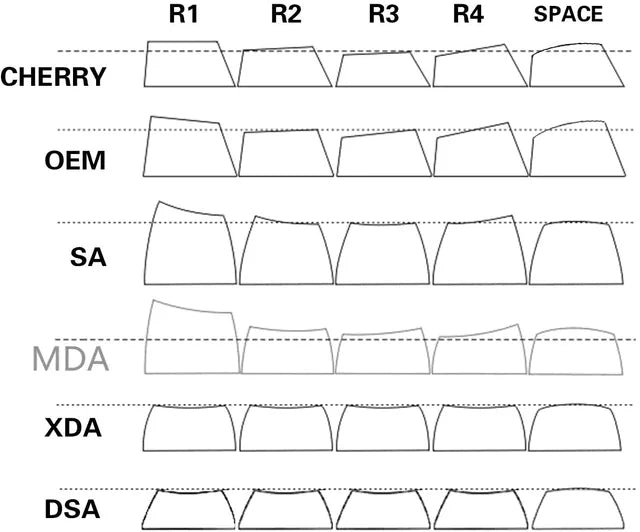
Cherry profile keycaps are the issue here. Cherry profile is a low, sculpted profile with a relatively shallow internal cavity, and the inner walls are angled in a specific way that just clears a standard MX-style switch housing — assuming the housing is the same height on all four sides. On a north-facing switch where the LED-window side stands taller, those inner walls aren't clearing anything. They hit.
Which keycap profiles fit a Wooting (and which don't)
| Profile | Works on Wooting? | Notes |
|---|---|---|
| OEM | ✅ Mostly yes (stock) | What Wooting ships. Most OEM sets clear fine. Exception: we've seen some Keytok OEM sets interfere on certain keys — worth checking before bulk install. |
| Cherry profile | ⚠️ Set-by-set | GMK Cherry-profile sets reliably interfere. Some other manufacturers have refined Cherry-profile molds with better internal clearance and don't interfere. Check the specific set, not just the profile name. |
| SA | ✅ Yes | Significantly taller; plenty of clearance. |
| MT3 | ✅ Yes | Sculpted and tall, very popular Wooting upgrade. |
| MOA | ✅ Yes | Tall uniform spherical profile; clears the LED housing fine. |
| KAT / KAM | ✅ Generally yes | The sets we've handled have cleared without issue, and we haven't seen widespread interference reports. If you're chasing a specific KAT/KAM set, ask us before buying and we'll double-check. |
| XDA | ✅ Yes | Tall uniform profile; no clearance issue. |
| MDA | ✅ Yes | Mid-height sculpted; no clearance issue. |
The takeaway: profile name alone isn't the whole story. Most Cherry profile sets interfere, but a few don't. Most OEM sets clear, but we've seen specific sets (Keytok in particular) that don't. The rule of thumb is to check the actual mold of the set you're buying — and if you're unsure, send us the brand and set name before you click order.
What does Cherry interference actually feel like?
- Mushy press. The keycap hits the switch housing before the switch fully bottoms out. You lose the last fraction of a millimeter of travel, and the press feels soft and indistinct rather than crisp.
- Reduced travel range. On a board where the entire point is adjustable actuation between 0.1mm and 4.0mm, losing real travel matters. Settings you tuned in Wootility no longer feel the way they did with stock keycaps.
- Weird scraping sound. Plastic-on-plastic where neither was meant to touch. Some keys are quieter than others depending on tolerance, but you'll hear it especially on heavier presses.
- Visible damage over time. The worst cases we've seen: a Cherry profile set put on a Wooting 60HE, used daily for a few weeks, then pulled — and the inside walls of the keycaps had visible scuff marks where they'd been rubbing the switch's LED housing.

This isn't subtle once you know what to look for. If you've ever installed a Cherry profile set on a Wooting and thought "the press feels weirdly soft" — it wasn't your imagination.
Workarounds (if you really want Cherry profile)
- Use dual-LED magnetic switches. A growing class of switches has light-pipe cutouts on both sides of the housing — UR Ice Ultra R2, UR Ice Extreme, Unionwell Ice Shine, Snow Shine and others. Because the housing is symmetric, there's no taller LED-window side for a Cherry profile keycap to hit. You can install these switches in the default orientation; both sides look the same anyway. Of all three workarounds, this is the one we'd actually recommend if you're set on Cherry profile.
- Switch profile, not switches. Honestly the simplest move. SA, MT3, MDA, and KAT/KAM sets are widely available, look great, and don't require you to fight the geometry of the board.
- Modify the keycap (not recommended). Some builders sand or file the inner walls of Cherry keycaps to give clearance. It works, technically. It also ruins the keycap set's resale value and risks structural issues at the keycap stem. We won't do this on a customer build.
Shopping keycaps for a Wooting build?
We stock OEM, MT3, SA, KAT, MDA, and other Wooting-compatible profiles at Toronto KeyboardMan — no guesswork on clearance. Free North America shipping over $179 CAD.
Shop Wooting-compatible keycap sets →
The 4 keycap buying mistakes we see most often
- Buying a GMK Cherry-profile set for a Wooting without checking. GMK is iconic, but it's Cherry profile. On a Wooting it will interfere. We've had to break this news to a few customers holding a $250 GMK group buy receipt.
- Buying by aesthetic only. A keycap set's photos tell you the colorway. They don't tell you the profile. Always check the profile field in the product description, especially on Aliexpress and third-party drop sites.
- Assuming "MX-compatible" means "Wooting-compatible." Almost all standard mechanical keycap sets are MX-compatible. That doesn't tell you anything about whether they clear a north-facing LED switch. Profile geometry matters more than MX fit in this case.
- Trying to "break in" Cherry profile on a Wooting. Cherry interference doesn't break in — the housing won't compress, the keycap won't reshape itself. You're just slowly scuffing both parts.
FAQ
What keycap profile does Wooting ship as stock?
OEM profile. It's not just a default — it's a deliberate choice to avoid interference with the north-facing LED placement on Wooting's PCBs.
Why does Cherry profile interfere with a Wooting?
Cherry profile keycaps have shallow internal walls originally designed around switches with symmetric housing height. Wooting's PCBs are north-facing, so the LED-window side of the switch housing is taller. Most Cherry profile sets — GMK in particular — don't have enough internal clearance for that taller side, so the keycap walls hit the housing before the switch fully actuates. A small number of Cherry-profile manufacturers have refined molds with deeper internal clearance that don't interfere, but they're the exception, not the rule.
Can I use GMK keycaps on a Wooting?
GMK sets are Cherry profile, so by default — no, not without interference. The workaround paths (dual-LED magnetic switches that don't have an asymmetric LED-window side, or sanding the keycap interior) are real but niche. For most buyers, the cleanest path is to pick a different profile.
What's the difference between OEM and Cherry profile?
Both are sculpted (rows have different heights and angles), but OEM is taller overall and has deeper internal walls. The extra height and depth is exactly what gives OEM clearance over a north-facing switch housing.
Are Wooting Lekker switches north-facing or south-facing?
The Wooting Lekker switch itself has an LED window that needs to be oriented toward the PCB's LED. Wooting's PCBs are north-facing, so when installed correctly, the Lekker's LED window faces north — making the housing effectively north-facing in that build.
Will MT3 or SA keycaps fit my Wooting 60HE or 80HE?
Yes. Both MT3 and SA are taller, sculpted profiles with plenty of internal clearance. They're two of the most popular non-stock Wooting upgrades we ship.
Where can I buy Wooting-compatible keycaps in Canada?
Right here. We carry OEM, MT3, SA, KAT, MDA, and other Wooting-friendly keycap profiles at Toronto KeyboardMan, with free North America shipping over $179 CAD.
Already have a keycap set and not sure if it fits your Wooting? Drop us a note with the brand and profile name before you install it — we'll tell you straight whether it'll clear or scrape.
Related reading: Do You Need to Lube Hall Effect Switches? · How Many Switches Does the Wooting 80HE Need?
— KeyboardMan, from the bench in Toronto
Share:
How Many Switches Does the Wooting 80HE Need? (2026 Buyer's Guide)
The Best Silent Hall Effect Switches in 2026 (Linear, Hybrid, and Why Most People Should Try One)
1 评论
The information on interference is outdated by years at this point. Gateron (who manufactures lekker switches) adjusted their molds, and almost all cherry kecaps fit without interference.
Check your ai before you post!