This site uses cookies for better user experience and analytics.
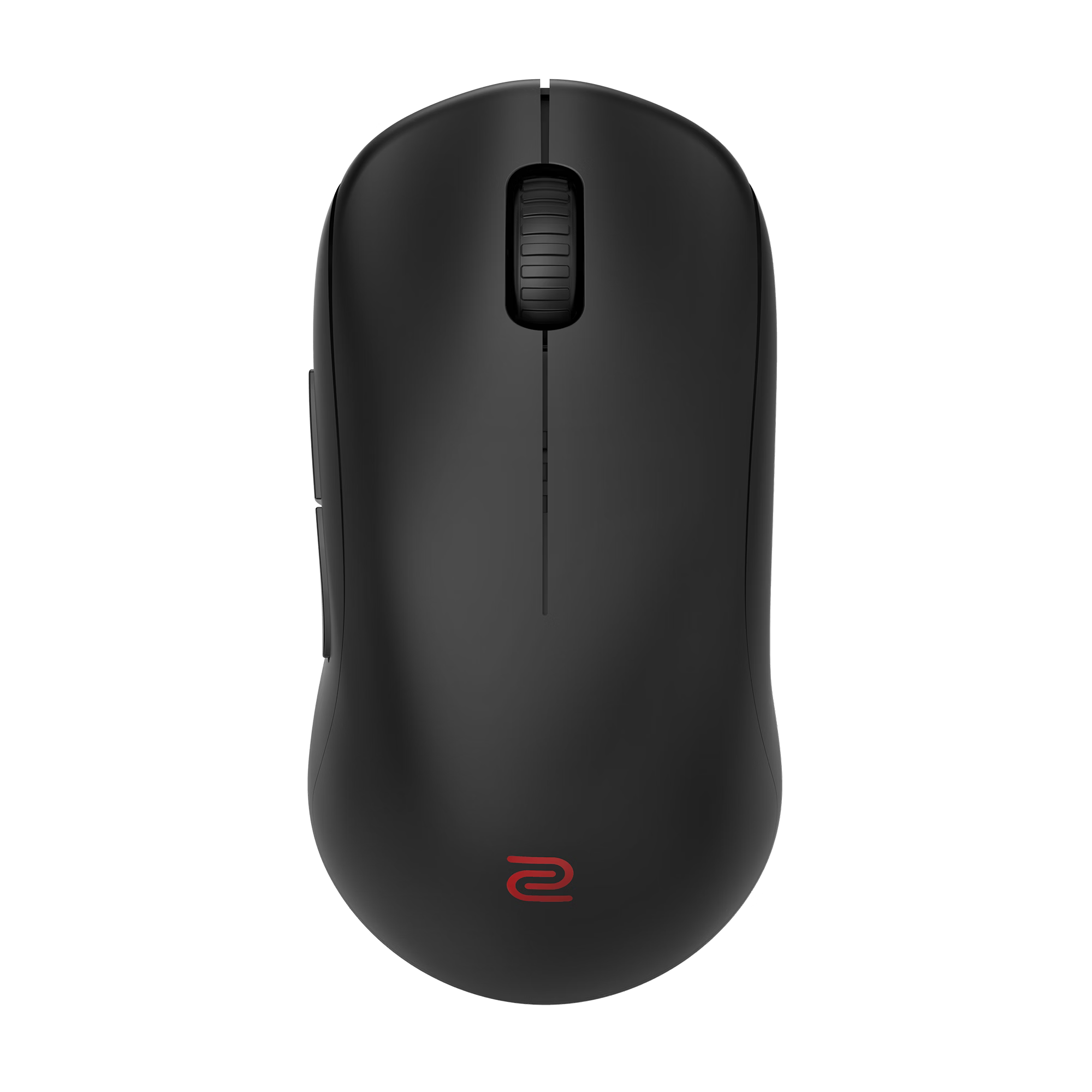
Zowie U2-DW
$199.99
Polling Rate
4000Hz
MCU
Nordic 52833
Material
Plastic
Switch
Huano Transparent Shell Pink Dot
Battery
300mAh
Sensor
PAW3950
Weight
60G
Dimensions
123.33*64.3*38.1mm
Total add-ons:
Out of stock
Couldn't load pickup availability
Pickup currently unavailable at Toronto KeyboardMan Showroom
Description
4K Wireless · Esports · Claw Grip
Zowie U2-DW 4K Wireless Mouse
For Claw-Grippers · Multi-Angle Movement · Agility & Enduring Performance
The U2-DW is Zowie's 60 g symmetrical wireless mouse built around inward-curved sides — a shape engineered to support lift agility, balanced ring-finger placement, and a faster index-finger click. 4000 Hz polling, motion-sync tuning, and an enhanced directional receiver round out a competition-first feature set.
Zowie designed the U2-DW around how claw-grip players actually move the mouse — fast lifts, multi-angle micro-corrections, and aggressive force exertion through the thumb and ring finger. The inward-curved sides give the hand more surface to clamp onto without adding bulk, so the mouse stays controllable in motion and stable on lift.
Performance at a Glance
60gWeight
4000HzMax Polling
3200Max DPI
80hrBattery @ 1kHz
7Buttons
24Scroll Steps
Curvy Sides — Agility During Lift
The inward curves on both sides give the hand a natural seat for the thumb and ring finger. That extra contact stabilizes the mouse during fast lifts and gives multi-angle micro-movements a more confident anchor point.
Left-Side Curve → Faster Click
The left-side curve, combined with the curved back, reduces the thumb angle — which supports a faster index-finger click. Click speed is biomechanically linked to thumb posture.
Right-Side Curve → Balanced Force
The right-side curve gives the ring finger a natural rest position. Force exertion stays balanced across both sides of the hand for cleaner movement and steadier aim.
Forward Side Buttons
Side-button placement was iterated through different shapes and positions. The forward press point reduces the thumb angle needed for access — quicker, less strained inputs mid-engagement.
Stable Lift
The inward-curved silhouette keeps the hand locked to the mouse during low arm-swing flicks and aggressive lifts. Better lift stability = cleaner repositioning.
Right-Side Curve vs Standard Symmetrical Shapes
Standard Symmetrical Mice
Without a right-side curve, force exertion across the hand is imbalanced — the ring finger doesn't seat naturally, which compromises stability during fast movement.
Zowie U2-DW
The right-side curve gives the ring finger a defined seat. Force stays balanced across both sides, supporting steadier control through flicks, micro-adjustments, and repositioning.
Enhanced Directional Receiver — Stable Wireless Signal
Generic dongles radiate equally in all directions — which means a chunk of signal capacity points away from the mouse and toward potential interference sources behind the receiver. The U2-DW's enhanced receiver is directional.
Standard Receivers
Non-directional reception footprint. Hard to orient for optimum signal pickup. Weaker transmission and more susceptibility to interference from any direction.
Zowie Enhanced Receiver
Directional reception footprint biased toward the mouse — stronger signal where it matters. Reduced range at the rear minimizes interference from behind the receiver.
Receiver Doubles as a Charging Dock
The enhanced receiver isn't just a dongle — it's also a charging dock. Drop the U2-DW onto it between rounds, between sessions, or overnight. No more accidental cable disconnections mid-charge, and no clutter from a separate cradle.
Plug & Play — No Driver Software
Everything is configured on the mouse itself. No client to install, no account to sign into, no background process. DPI, USB report rate, lift-off distance, click response time, and motion sync are all adjusted via on-mouse controls.
DPI
400 / 800 / 1000 / 1200 / 1600 / 3200 — six stops covering low-DPI FPS sensitivities through to higher-DPI desktop use.
Report Rate
125 / 500 / 1000 / 2000 / 4000 Hz. Push to 4 kHz for tournament-grade response or drop to 1 kHz to stretch battery life.
Click Response Time
Two modes — Fast or Normal. Pick the click latency profile that matches your input style and game.
Motion Sync
Toggle on or off depending on whether your title or aim style benefits from synchronized sensor reports.
Lift-Off Distance
Adjustable LOD so the sensor stops tracking exactly where your lift habit ends — no drift, no over-tracking on reposition.
No Driver Required
Works the same way on every PC the moment it's plugged in. No software footprint, no background process — clean for competition setups.
Specifications
General
Size
Medium
Design
Symmetrical · Right-Handed
Weight
60 g
Buttons
7
Scroll Wheel
24-Step Optical
Connectivity
2.4 GHz Wireless
USB
USB 2.0 / 3.0 Plug & Play
Performance
DPI
400 / 800 / 1000 / 1200 / 1600 / 3200
Report Rate
125 / 500 / 1000 / 2000 / 4000 Hz
Click Response Time
Fast / Normal
Motion Sync
On / Off
Battery Life
80 hr @ 1 kHz · 30 hr @ 2 kHz · 24 hr @ 4 kHz
What's in the Box
Zowie U2-DW wireless mouse
Enhanced Wireless Receiver (also serves as charging dock)
USB Wireless Receiver
USB Type-C Adapter
USB-C Cable — 2 m / 6.6 ft
Skatez (Type E Black & White)
FAQ
Is the Zowie U2-DW good for claw grip?
Yes — claw grip is the explicit design target. The inward-curved sides give the thumb and ring finger a natural seat, the symmetrical medium shape suits claw hand sizing, and the 60 g weight supports the fast lifts claw grippers rely on.
Is 4000 Hz polling worth it?
At 4 kHz the U2-DW reports four times more often than a standard 1 kHz mouse, which can reduce perceived input latency on high-refresh-rate displays (240 Hz+). The tradeoff is battery: 24 hr at 4 kHz versus 80 hr at 1 kHz. Most competitive players keep it at 1 kHz or 2 kHz for the battery balance and switch to 4 kHz for tournaments.
Do I need to install Zowie software?
No. The U2-DW is plug-and-play. DPI, report rate, lift-off distance, click response time, and motion sync are all configured on the mouse itself — no driver, no client, no background process.
How does the charging dock work?
The enhanced wireless receiver doubles as a charging dock — set the mouse on it between rounds or overnight. Wired charging via the included 2 m USB-C cable is also supported.
What size hand is the U2-DW best for?
Medium. The U2-DW is a medium-sized symmetrical right-handed shape — best for hands roughly 17–19 cm long using claw or modified-claw grip. Smaller hands may prefer the U2 (small) variant.
Will Obsidian or other replacement mouse skates fit the U2-DW?
The U2-DW ships with Zowie's own Type E skates (Black & White included). For aftermarket replacements you'll need a model cut specifically for the U2-DW footprint — browse our mouse skates collection for compatible options.
Which mousepad pairs best with the U2-DW?
It depends on grip and aim style. Claw-grip players who prefer control often pair Zowie mice with cloth control or balanced pads; speed-focused players lean toward glass or fast cloth. Browse our gaming mousepad collection for surface options.
14 Days Refund Policy
Cancellation
You may cancel an order before we fulfilled it. Please allow 3-5 business days for the refund to process to your original method of payment.
Returns
Please note that we currently do not accept returns from the EU or OCE. We apologize for this inconvenience.
Our return policy lasts 14 days. If 14 days have passed since you received, we cannot offer a refund or exchange. To be eligible for a return, your item must be unused and in the same condition that you received it. It must also be in the original packaging.
To complete your return, we require a receipt or proof of purchase. Please do not send your purchase back to the manufacturer.
Partial Refunds
There are certain situations where only partial refunds may be granted, including but not limited to:
Items showing obvious signs of use
Any item not in its original condition, is damaged, or missing parts for reasons not due to our error
Any item returned more than 30 days after delivery
In these cases, we reserve the right to issue a partial refund, depending on the condition of the returned item.
Shipping
You will be responsible for any and all shipping costs of returning an item. Shipping costs are non-refundable.
Depending on your shipping location, the time it takes for an exchanged product to be delivered may vary.
If you are shipping an item over $75, please consider using a trackable shipping service or purchasing shipping insurance, as we can't guarantee that we will receive your returned item.
Refunds (if applicable)
Once your return is received and inspected, we will send you an email to notify you that we have received your returned item. We will also notify you of the approval or rejection of your refund.
If approved, your refund will be processed and the credit will be automatically applied to the original method of payment within 10 business days, depending on your bank.
Late or missing refunds (if applicable)
If you have not received a refund yet, please check your bank account. Contact your credit card company, as it may take time before your refund is officially processed and posted.
Only regular priced items may be refunded. Discounted items cannot be refunded.
Exchanges (if applicable)
We only replace items if they are defective or damaged. If you receive a damaged or defective product you have 72 hours upon arrival of the product to contact us regarding the defective unit at contact@torontokeyboardman.ca.
Shipping with Protection
At Toronto KeyboardMan, we strive to process and ship your order as quickly as possible. Below are the details of our shipping policy:
Processing Time
Orders are typically processed and shipped within 1-2 business days (excluding weekends and holidays).
You will receive a confirmation email with tracking information once your order has been shipped.
Shipping Protection & Insurance
All shipments include protection (insurance) to safeguard against loss or damage during transit.
If your package is lost or damaged, please contact us immediately so we can assist you in filing a claim.
Shipping Rates & Delivery Time
We offer the following shipping options:
Within Canada
Standard Shipping: 3-7 business days
Express Shipping (GTA Only): Same or Next Business Day
Expedited Shipping (Ontario): 1-2 business days
United States
Standard Shipping: 3-7 business days
Expedited Shipping: 2-4 business days
International Shipping
Delivery times vary based on destination and shipping method selected.
Order Tracking
A tracking number will be provided via email once your order has shipped.
You can track your order through the courier’s website for real-time updates.
Customs, Duties & Taxes (International Orders)
Customers outside of Canada are responsible for any customs duties, taxes, or import fees charged by their country.
We are not responsible for delays due to customs clearance.
Shipping Address & Delivery Issues
Please ensure your shipping address is accurate and complete before placing your order.
If an incorrect address is provided, additional fees may apply for reshipping.
If your package is marked as delivered but not received, please check with your local carrier or neighbors before contacting us.